AI Hardware & Infrastructure · 24 Nov 2026 · 19:44 CET
How to Run NVIDIA Cosmos 3 on Local AI Devices Using Hugging Face Diffusers
Publisher preview · OZZZER analysis pending editorial review.
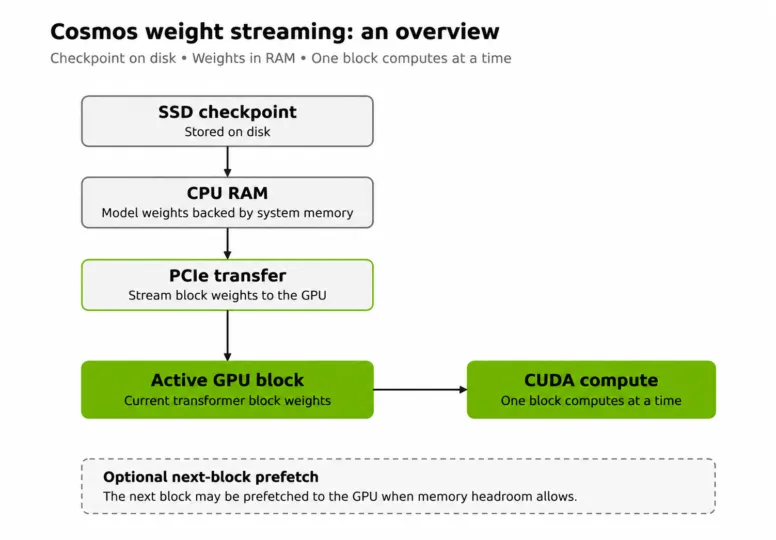
Running video generation models locally can be challenging when model weights and intermediate data exceed available GPU memory. NVIDIA Cosmos 3 Nano is a world foundation model that generates videos from text, images, and other inputs to support physical AI development. Learn more about NVIDIA Cosmos for physical AI. This tutorial walks you through how to run Cosmos 3 Nano on a GPU with as little as 12 GB of VRAM by storing most model weights in system RAM and transferring them to the GPU as needed.
Using Hugging Face Diffusers, you’ll generate your first video, explore sound and additional input types, and use an FP8 checkpoint to further reduce memory requirements. This streaming adapter builds on top of the native group offloading approach from the Hugging Face library to enable generation on a smaller GPU. The tradeoff is that this requires increased system RAM use and PCIe transfers for a smaller GPU-memory requirement.
Note that this approach does not provide interactive latency or stream weights directly from disk during inference. Use an existing Linux environment with Python 3.12 and…
Excerpt supplied by the publisher.
Source
NVIDIA · 24 Nov 2026 · 19:44 CET
Open the original at NVIDIA ↗