Models & tools · 14 Nov 2026 · 00:22 CET
Production MLOps at GS Caltex with Amazon SageMaker Canvas, part 1
Publisher preview · OZZZER analysis pending editorial review.
PUBLISHER ARTICLE PREVIEW
From the original article
GS Caltex uses Amazon SageMaker Canvas and Amazon SageMaker Pipelines to connect process engineers’ models to production workflows. The South Korean energy and chemical company divides model development and operations between engineers with complementary skills.
Process engineers build and validate models in SageMaker Canvas without writing code, drawing on their process knowledge. Machine learning (ML) engineers configure SageMaker Pipelines workflows for deployment and scheduled inference.
Moving assets from SageMaker Canvas into SageMaker Pipelines still required integration work. ML engineers had to set data paths for production, supply the model configuration, and connect preprocessing and inference jobs. GS Caltex automated this handoff while reusing the assets created in SageMaker Canvas.
GS Caltex reports that its ML engineers now deploy models within a few hours, compared with about a week before. The company runs batch inference every 30 minutes, reducing the need for continuously running endpoints. GS Caltex reports that this has meaningfully lowered its inference costs.
This post explains how GS Caltex connects SageMaker Canvas to SageMaker Pipelines and reuses validated preprocessing flows and models in production.
The machine learning operations (MLOps) workflow has two paths: preparing a new model version for deployment, and running batch inference with the deployed model.
You can use SageMaker Canvas to prepare data visually, build models, and generate batch predictions. You can also register validated models in Amazon SageMaker Model Registry from SageMaker Canvas. GS Caltex built a separate handoff process to turn these assets into executable SageMaker Pipelines steps.
Process engineers understand the variables and data behind a process and assess whether a model’s predictions are useful. ML engineers turn the resulting assets into production jobs and manage model versions and execution history.
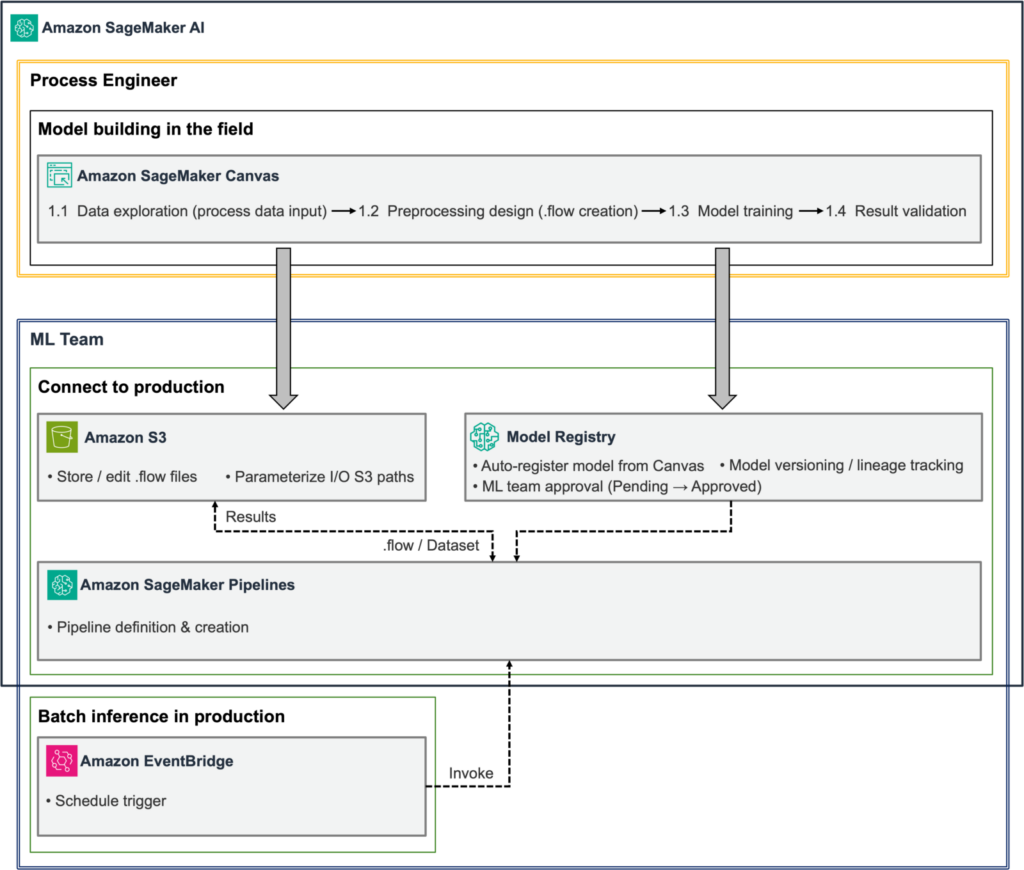
The following diagram shows how process engineers hand off SageMaker Canvas assets to ML engineers for deployment and scheduled inference. ML engineers use Amazon Simple Storage Service (Amazon S3) for preprocessing flows and Model Registry for model versions, then schedule pipeline runs through Amazon EventBridge.
ML engineers receive the preprocessing flow and model from SageMaker Canvas and review the data formats and prediction results. After that review, they approve the model in Model Registry and deploy it. This preparation takes place when a new model version is deployed. Subsequent inference runs reuse the deployed model.
Amazon EventBridge starts each scheduled run. SageMaker Pipelines prepares the input data from Amazon Simple Storage Service (Amazon S3), runs preprocessing and SageMaker Batch Transform, and stores the results in S3. ML engineers can inspect step status and Amazon CloudWatch logs to monitor the workflow.
The production pipeline reuses the preprocessing logic and trained model created in SageMaker Canvas. ML engineers configure the input and output paths, set the order of execution, and write the code that connects approval and scheduling to the workflow.
The full reference implementation is available in the GitHub repository. The code examples in this post focus on the connections between components. The repository uses a sample loan classification model, so adjust the configuration to match your model’s input and output formats.
The following steps cover preprocessing reuse, model approval and deployment, pipeline construction, and scheduled inference.
A preprocessing flow created with Data Wrangler in SageMaker Canvas records the data sources and transformation steps. To set up the reference implementation, export data to Amazon S3 using SageMaker Processing, then retrieve the job settings and the .flow file used by that job.
In the export settings, turn off Auto job configuration and select SageMaker Processing. After the export starts, open the Processing job details on the Amazon SageMaker AI console. Record the container image URI, the S3 URI of the input named flow, the execution role, and the output settings. Use these values to configure the pipeline step that runs the .flow file.
The SageMaker execution role must have permissions to read the required S3 data, write the results, and access the container image. Choose the instance type and count based on the volume of data you need to process.
Source
AWS AI · 14 Nov 2026 · 00:22 CET
Open the original at AWS AI ↗