Automation & Agents · 26 Oct 2026 · 18:27 CET
Groundhog Day for AI agents: Prompt caching patterns for using OpenAI models on Amazon Bedrock
Publisher preview · OZZZER analysis pending editorial review.
PUBLISHER ARTICLE PREVIEW
From the original article
Every time you spin off your agent, it has to re-read its whole life story before performing an action. Here’s how to make it remember without having to feed it the same context again.
In the movie Groundhog Day, Bill Murray’s character re-lives the same February 2 every day. He wakes up to the same song playing on the radio, in the same inn, and the same small town, again and again for what some movie fans estimate to be 34 years.
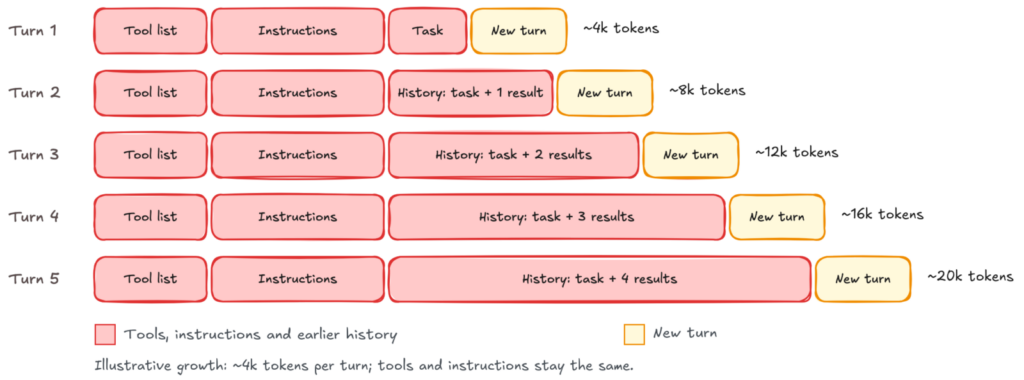
Nothing he accomplished the day before carries over unless he works it out again from scratch. AI agents live in a version of Groundhog Day. Every time an agent takes a step (calls a tool, reads the result, decides what to do next), it has to send the model its entire story so far to maintain continuity: the tool definitions, the instructions, every previous tool call, and every result.
The model only predicts the next token based on the input you provide. It has no internal memory between requests, so it must read all of it again. By turn 20 of a coding session, the model re-reads turns 1–19, and it’s you who pays for every one of those tokens, again and again.
Prompt caching breaks the cycle. The service stores your input prompt (instructions, tools, and content) and reuses it on the next request, at a fraction of the input price.
In this post, I walk you through an agent’s life, from its first turn to when it gets new tools and spawns helpers. Along the way, I show you how prompt caching keeps costs down and keeps agents responsive and consistent.
Before talking about caching, it helps to look at what a typical agent’s first invocation to the large language model (LLM) contains:…
What an agent sends to the model, turn after turn if you don’t set up caching:…
When a model reads a prompt, it first does a write called prefill. During prefill, it processes every input token and builds its key and value vectors (also known as key-value, or KV), which form the model’s working state. This happens before the model writes its first token.
Prompt caching saves that state, which contains the system prompt, tools, content, history, and so on. When a later request starts with the same input tokens (that is, the same text), the prompt caching service loads the saved state instead of computing it again. It then processes only what is new in the next payload to the model.
Prompt caching can be implicit, where Amazon Bedrock selects where the reusable prefix ends, or explicit, where your code marks that endpoint using prompt_cache_breakpoint. You can use both approaches together, and we recommend doing so.
For agentic workloads, implicit caching lets Bedrock choose what to cache as the conversation grows. With explicit caching, you can mark shared content, such as tools and instructions, for reuse across sessions and when spinning up helper agents. You don’t always need both forms of caching, but combining them gives you a reusable starting point while Bedrock manages the growing conversation automatically.
New sessions can also reuse that shared starting point while each conversation builds on its own cached history. In this post, we start with the first turn, then show how to carry cached content through later turns, new tools, and across subagents.
The first win is to cache the static part of the prompt: the tools and instructions that stay the same across requests. These examples use your existing Amazon Bedrock client, TOOLS, and task. Replace the shortened INSTRUCTIONS string with your real policies and examples. The reusable prefix must reach 1,024 tokens to qualify.
When caching static content, use explicit mode: choose where the saved prefix ends.
The prompt_cache_key tells the service which requests are meant to share a cache. We come back to how to use it when we get to reading the cache in new sessions.
Source
AWS AI · 26 Oct 2026 · 18:27 CET
Open the original at AWS AI ↗