Automation & Agents · 20 Oct 2026 · 17:39 CEST
Build a semantic layer for agentic AI on AWS with Denodo and Amazon Bedrock AgentCore
Publisher preview · OZZZER analysis pending editorial review.
PUBLISHER ARTICLE PREVIEW
From the original article
Agentic AI applications need governed access to live enterprise data. That data can live in operational systems, analytical warehouses, SaaS applications, other clouds, or on premises. In the previous post in this series, we built a semantic layer on AWS using Stardog’s knowledge graph over Amazon Aurora and Amazon Redshift. A Strands agent on Amazon Bedrock AgentCore queried that layer.
Amazon Bedrock AgentCore is a platform to build, connect, and optimize agents at scale, with any framework or model. This post uses the same customer 360 pattern, but swaps in a different semantic layer implementation and extends the source mix.
Two things change here. First, the semantic layer is the Denodo Platform: an AI data layer that provides active context and live, zero-copy access to distributed enterprise data. The agent talks to it in VQL, Denodo’s SQL dialect. Second, the source mix includes an on-premises PostgreSQL database alongside Amazon Aurora and Amazon Redshift, so the federation problem is no longer bounded by an Amazon Virtual Private Cloud (Amazon VPC).
The rest of the pattern carries over. A foundation model on Amazon Bedrock plans and writes queries. The Denodo MCP Server exposes governed views to the agent through the Model Context Protocol (MCP). Amazon Bedrock AgentCore hosts the agent, terminates inbound authentication, and manages the outbound credential the agent presents to Denodo. Everything the model reasons over lives inside the semantic layer rather than the prompt: the joins, the metric definitions, and the row and column filters that apply to the caller.
We assume you’re familiar with the semantic-layer architecture from the previous post: what it is, what it’s for, and why the model plans query without owning the joins. If any of that is new, the previous post covers the ground.
We stay with the same customer 360 pattern from the previous post. The Stardog C360 Knowledge Kit used in the previous article models an ecommerce retailer with two motivating use cases: understanding churn and identifying customers for auto-enrollment in a rewards program. The schema doesn’t change in this post. What changes is where one table lives: rewards_account sits on an on-premises PostgreSQL cluster rather than in Amazon Aurora with the rest of the customer profile data.
That placement isn’t a special case. Enterprise data sources might be outside AWS: on premises, in a SaaS tool like a CRM, or in another cloud. The semantic layer must reach whichever applies. We use on-premises PostgreSQL for the walkthrough that represents data from a third-party application. The Extending to other sources section covers what changes when the source is a SaaS tool, a CRM, or a mainframe.
It also covers the other hundreds of data sources that Denodo supports by default.
The shared identifier is cid, a plain integer that appears as the primary key in the Aurora customer table. It appears as a non-foreign-key column in the Amazon Redshift order table and the on-premises rewards_account. Within Aurora itself, the customer.location column is an integer foreign key to address.id, which is how the profile joins to the address record.
There is no foreign key that spans two engines, and no ETL job to build one. Answers that join customers to their purchases and their rewards enrollment must reconcile cid at query time.
A representative question this setup answers: “Which of our top 20 customers by lifetime spend haven’t enrolled in the rewards program yet?” This is the auto-enrollment scenario from the Stardog kit, and it needs profile data from Aurora, lifetime spend from Amazon Redshift, and enrollment status from the on-premises cluster to answer.
Denodo plans the federated query at execution time, deciding what to push into Aurora, what to push into Amazon Redshift, what to fetch from the on-premises cluster, and how to combine the results. No data moves between sources, and the semantic layer stays declared once for every consumer to reuse.
Denodo implements the semantic layer as a data virtualization platform. Denodo Virtual DataPort (VDP) is the query engine at the core: it’s where the semantic-layer objects live, where VQL executes, and where access policies evaluate. Design Studio is the browser-based authoring surface for VDP. Every object modeled in this post is defined there.
VQL is Denodo’s SQL dialect. It’s ANSI-aligned SQL plus a set of Denodo-specific constructs, notably DDL constructs to represent data sources and syntax for semantic metric views. In an agentic scenario, the specific syntax of VQL is provided by a skill that will be used by the LLM when using Denodo tools to facilitate correct use of Denodo’s syntax.
A Global Security Policy (GSP) is a runtime access-control rule that applies to views or columns carrying a specific tag. GSPs are how row filters and column masks get enforced at query time, evaluated per caller.
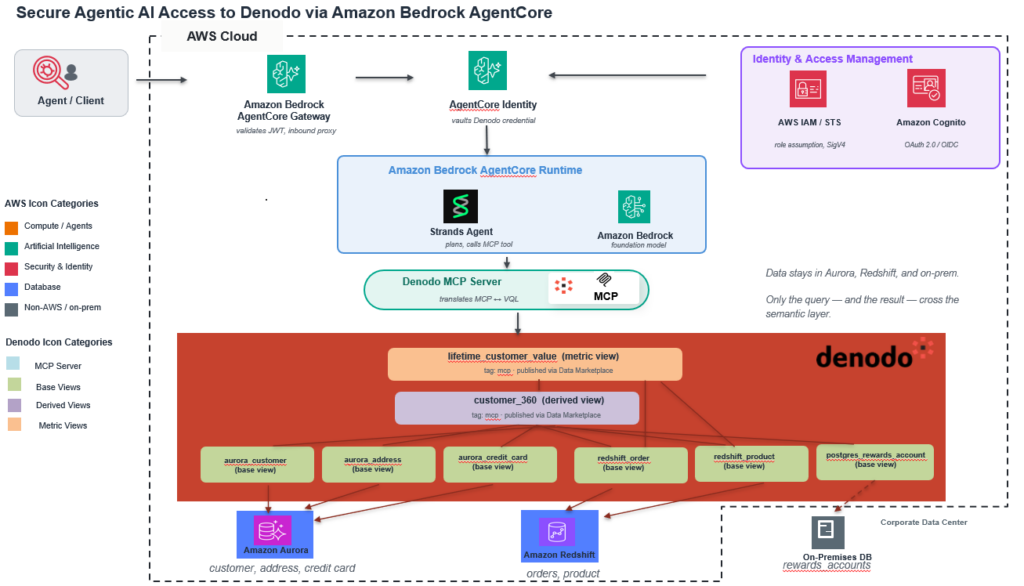
The runtime has two flows. Inbound: A client sends the user’s request to the agent through Amazon Bedrock AgentCore Gateway. Gateway validates the JSON Web Token (JWT) that identifies the human user against the enterprise identity provider (IdP), then routes the request to Amazon Bedrock AgentCore runtime, which hosts the Strands agent process. The agent invokes a foundation model on Amazon Bedrock (Anthropic Claude Sonnet 4.6 in this walkthrough) to interpret the prompt and plan the query.
Outbound: AgentCore Gateway also acts as the outbound proxy for the agent’s tool calls. The Denodo MCP Server is registered as an MCP target on Gateway, so tool calls the agent makes for enterprise data route through Gateway to the MCP Server. Before the request reaches Denodo, AgentCore Identity performs an On-Behalf-Of token exchange, converting the human user’s inbound token into a scoped access token that represents the same user with Denodo as the audience.
The Denodo MCP Server accepts the exchanged token as a bearer credential and forwards the VQL request to Denodo Virtual DataPort (VDP) over JDBC. VDP validates the token independently, resolves the caller to a Denodo role, applies access policies, and plans the federated query against Amazon Aurora, Amazon Redshift, and the on-premises PostgreSQL cluster.
Only the VQL request travels down to VDP and the result set travels back up. No source data moves between engines. Aurora, Amazon Redshift, and the on-premises cluster respond to native SQL rewritten by VDP’s federated optimizer. The following sections cover the identity propagation and policy enforcement in detail. Additional sections cover the MCP Server registration and agent deployment steps.
The semantic model in Denodo is not a single artifact. It’s a collection of base views, derived views, metric views, and tags in VDP that together present business-meaningful data to consumers. Building the semantic model in this post means creating each of those pieces.
We build in three passes: base views over each source table, a derived view (customer_360) that joins the base views on cid at the customer level, and a metric view (lifetime_customer_value) that defines a reusable spend aggregation queries can join in when they need it.
In practice, this modeling is done visually in Denodo Design Studio. You drag Aurora, Amazon Redshift, and the on-premises PostgreSQL source onto a canvas, draw joins between them, and rename or re-type fields (for example, mapping cust_ref to customer_id) through a form rather than hand-written DDL. Attaching the security policies covered later in this post also happens inside the same UI.
Metric views live beside the derived views that reference them, defined once and reused. If two teams build two different customer-level views over the same base data, both surface the same metric definitions.
Each source table becomes a base view in VDP. For the Aurora customer table, that means introducing Aurora using the specific connector in Design Studio, pointing at the schema, and letting VDP introspect the columns. Design Studio handles the introspection.
Source
AWS AI · 20 Oct 2026 · 17:39 CEST
Open the original at AWS AI ↗