Automation & Agents · 24 Sep 2026 · 18:12 CEST
Build a multi-account AI agent with AgentCore Gateway and MCP
Publisher preview · OZZZER analysis pending editorial review.
PUBLISHER ARTICLE PREVIEW
From the original article
Enterprises increasingly want AI agents that can reason over data spread across many AWS accounts without copying or centralizing it. Each team keeps its data in its own account for good reasons: clear ownership, scope isolation, and independent deployment lifecycles. But an agent that sees only one account’s data delivers limited value, and connecting it to distributed sources usually means replicating data or untangling cross-account AWS Identity and Access Management (IAM).
The goal is to let data stay where it already lives, in each line-of-business (LOB) account. Only the specific data a request needs flows out at query time, so the underlying datasets do not leave their owning account.
In this post, you build a multi-account architecture that keeps each team’s data in its own account while giving agents a unified way to query across them, using Amazon Bedrock AgentCore Gateway and Model Context Protocol (MCP). Amazon Bedrock AgentCore is an agentic service for building, deploying, and operating highly effective agents securely at scale.
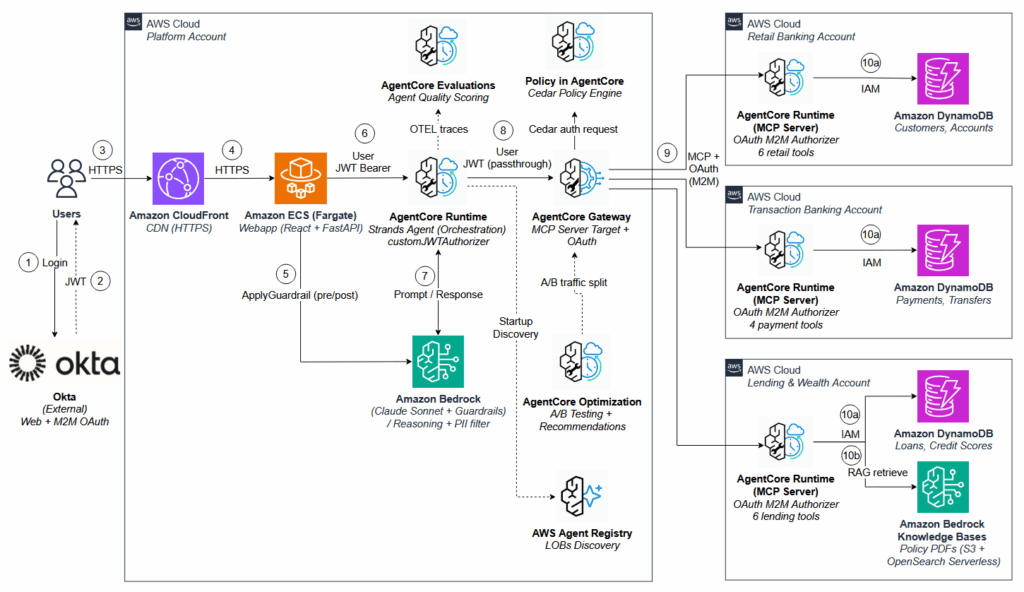
A central platform account hosts the agent tier and large language model (LLM) inference through Amazon Bedrock. LOB teams expose their data and tools as MCP servers, and the platform account’s AgentCore Gateway gives agents a single endpoint for tool discovery and invocation across registered LOBs. Along the way, you set up cross-account MCP integration, authentication with AgentCore Identity, a capability of Amazon Bedrock AgentCore, and Okta, fine-grained authorization with Policy in Amazon Bedrock AgentCore, and the governance controls that support production readiness.
The architecture follows a multi-account model with three layers: a central platform account, distributed LOB accounts, and AgentCore Gateway as the integration layer that connects them.
The platform team owns the platform account, which runs the agent on AgentCore Runtime, a capability of Amazon Bedrock AgentCore. AgentCore Runtime is a serverless, framework-agnostic environment with session isolation in dedicated microVMs, consumption-based pricing, and built-in authentication. To keep the walkthrough clear, this post uses a single agent, but the same pattern supports multiple agents in the platform account.
The agent connects to the platform account’s Gateway rather than to individual LOB MCP servers.
LLM inference runs in the platform account through Amazon Bedrock. The platform team controls available foundation models (FMs), applies Amazon Bedrock Guardrails, and tracks costs through a single billing boundary, avoiding the overhead of managing model quotas across dozens of LOB accounts. As demand grows, some organizations distribute inference across several dedicated inference accounts, placing AgentCore Gateway in front as an Inference Gateway that routes traffic across model providers, selecting the provider based on the request and applying per-team rate limits.
AgentCore Gateway in the platform account acts as the single MCP endpoint for the agent. It registers each LOB account’s MCP server as a target and, from that one endpoint, provides unified tool discovery with semantic search, centralized authentication through AgentCore Identity, fine-grained authorization with Policy in AgentCore, and observability.
Beyond aggregating MCP servers and acting as an Inference Gateway, AgentCore Gateway supports additional target types that make it a central integration point. HTTP targets bring AgentCore Runtime agents, agent-to-agent (A2A) services, and other HTTP endpoints into the same governed endpoint, each addressable through its own sub-path. The platform team can also apply Amazon Bedrock Guardrails for content safety and configure Policy in AgentCore (Cedar) for fine-grained access control, both enforced at the Gateway layer outside the agent’s code.
Rather than exposing raw AWS resources (Amazon Simple Storage Service (Amazon S3) buckets, databases, Amazon Bedrock Knowledge Bases) directly, each LOB team packages its data and tools as an MCP server. The retail banking team exposes tools like get_balance and get_profile. The lending team offers get_credit_score and search_lending_policies, where the latter queries the fully managed Retrieval Augmented Generation (RAG) capability in Amazon Bedrock Knowledge Bases over bank policy PDFs.
This reference architecture wraps a standalone Amazon Bedrock Knowledge Base inside the MCP server for fine-grained control over the retrieval pipeline. For new implementations, you can instead attach an Amazon Bedrock Managed Knowledge Base directly to the Gateway as a native connector, so agents query it with standard MCP calls and you operate no retrieval infrastructure.
The MCP server runs on AgentCore Runtime in the LOB account, a serverless, framework-agnostic environment with session isolation in dedicated microVMs, consumption-based pricing, built-in authentication through AgentCore Identity, and agent-specific observability. This gives LOB teams full ownership of their tool surface: they decide what to expose and what business logic runs behind each tool, and can change the implementation without affecting the platform agent, as long as the MCP tool interface stays consistent.
This architecture follows a hub-and-spoke pattern: each LOB deploys a standalone MCP server (the spoke) using MCP over Streamable HTTP, while AgentCore Gateway (the hub) aggregates them behind a single endpoint. The agent connects to the Gateway as one MCP server, and the Gateway federates tool invocation across registered LOB targets. When the agent invokes a tool, the Gateway retrieves OAuth 2.0 machine-to-machine (M2M) credentials from AgentCore Identity, attaches them to
Source
AWS AI · 24 Sep 2026 · 18:12 CEST
Open the original at AWS AI ↗