AI Video · 28 Sep 2026 · 18:15 CEST
Generate images and video with vLLM-Omni on SageMaker AI – Part 2
Publisher preview · OZZZER analysis pending editorial review.
PUBLISHER ARTICLE PREVIEW
From the original article
In this post, you turn a text prompt into an image, then animate that image into a short video on Amazon SageMaker AI. You deploy two endpoints from the same AWS vLLM-Omni Deep Learning Container (DLC): a real-time endpoint for FLUX.2-klein-4B image generation and an asynchronous endpoint for Wan2.1-VACE-1.3B video generation.
The workflow sends a text prompt to generate a still image, then passes the image and a motion prompt to the video endpoint. It retrieves the MP4 from Amazon Simple Storage Service (Amazon S3) and provides an optional Streamlit interface.
AWS Deep Learning Containers package frameworks and dependencies for training and inference on AWS. The AWS vLLM-Omni DLC packages tracked vLLM-Omni releases and adds routing middleware for SageMaker AI. vLLM-Omni extends vLLM beyond text generation to models that process or generate text, audio, images, and video through OpenAI-compatible APIs.
This post continues a series about specialized AWS DLCs. Part 1 uses vLLM-Omni and SageMaker AI bidirectional streaming for real-time speech. Part 2 covers real-time and asynchronous inference: the image model returns its result inline, while the longer-running video model writes its output to Amazon S3. Keeping image and video generation separate from the text-to-speech walkthrough also makes the different models, payloads, and response patterns clear.
You clone the code sample, deploy FLUX.2-klein-4B for image generation, and pass its output to Wan2.1-VACE-1.3B for image-conditioned video generation. The sample includes a command-line workflow and a Streamlit application.
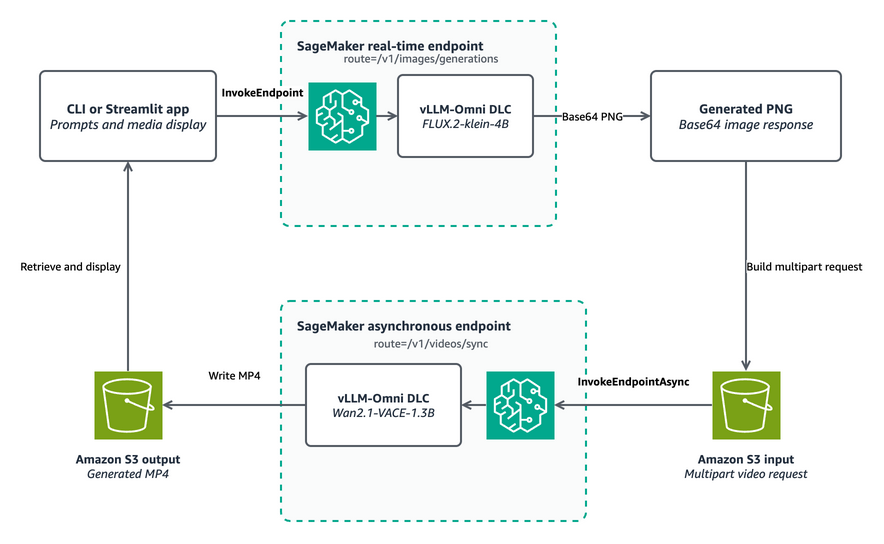
The solution deploys the same pinned AWS vLLM-Omni DLC image to two SageMaker AI endpoints. The deployment script changes SM_VLLM_MODEL to load FLUX.2-klein on one endpoint and Wan VACE on the other. Keeping a common container image reduces serving-stack variation, while separate endpoints let each model use the instance type and inference option that fits its workload.
Figure 1 shows the request path. The application sends the image prompt to FLUX.2-klein and receives a base64-encoded PNG. It resizes the image to the video dimensions, converts it to a compact JPEG data URL, and inserts that reference into the Wan VACE request. SageMaker Asynchronous Inference reads the multipart request from Amazon S3 and writes the MP4 to the returned output location.
Figure 1: A CLI or Streamlit application invokes a FLUX.2-klein real-time endpoint, passes the generated PNG through
Source
AWS AI · 28 Sep 2026 · 18:15 CEST
Open the original at AWS AI ↗