Unclassified · 4 Jun 2026 · 11:00 CEST
Dreaming: Better memory for a more helpful ChatGPT
Publisher preview · OZZZER analysis pending editorial review.
PUBLISHER ARTICLE PREVIEW
From the original article
Improving memory synthesis in ChatGPT to optimize for freshness, continuity and relevance.
Today we’re beginning to roll out a more capable and scalable system for synthesizing memory, developed to tackle the staleness, correctness, and scalability challenges that we observe when memory is applied to the hundreds of millions of users and multi-year time horizons in ChatGPT.
Memory is what helps ChatGPT learn your preferences, projects, and constraints, allowing future conversations to start from shared context rather than from scratch.
Over the last two years, memory has grown into a critical part of the ChatGPT experience, helping ChatGPT better understand your context so it can help you accomplish meaningful goals over time. This is central to making ChatGPT more useful: knowing you, helping you, and doing more for you.
This update is available to Plus and Pro users in the US today, and will roll out to additional countries and Free and Go users over the coming weeks.
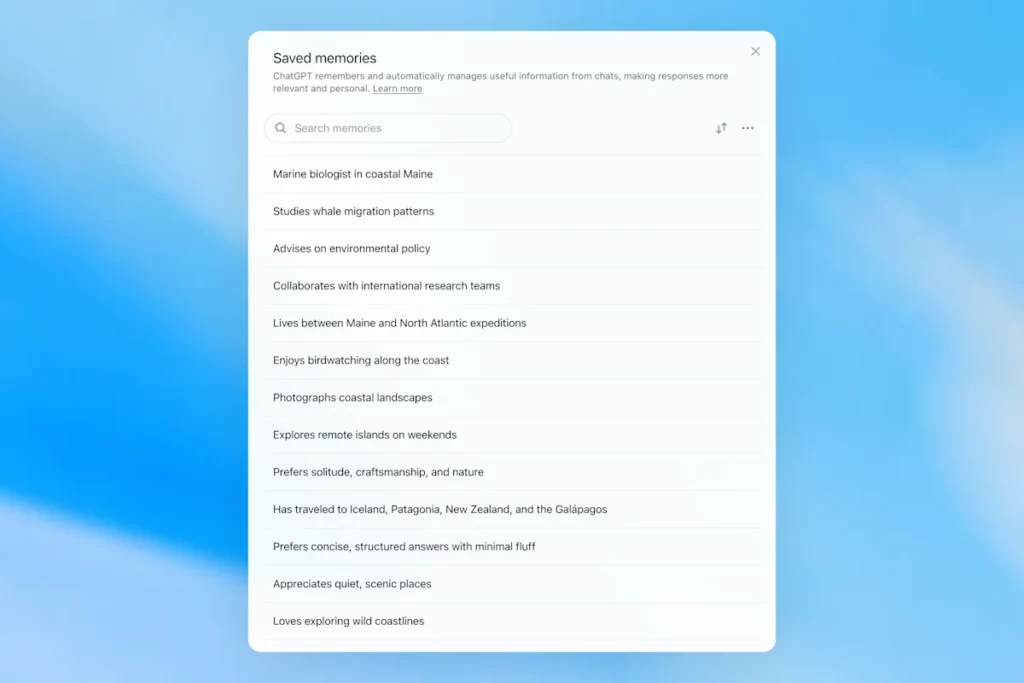
Memory first launched in April 2024 (also known as saved memories). The feature let you ask ChatGPT to remember information and carry it forward into future chats.
Saved memories were only written during the conversation and relied on strong cues to decide when to trigger memory, such as an instruction to "remember I’m traveling to Singapore in July." In practice, interacting with this system could feel like talking to someone who took a few notes, but still forgot everything that wasn’t written down.
Saved memories also tend to go stale over time and eventually become incorrect or irrelevant.
In April 2025, we updated ChatGPT’s memory by giving the model the ability to reference chat context outside of the saved memories list; this was done by introducing the first version of dreaming—a method for ChatGPT to automatically curate memories in the background by referencing chat history.
In contrast to saved memories, dreaming leverages a background process that allows ChatGPT to learn from many conversations and synthesize ChatGPT’s memory state in order to always provide the freshest, most relevant context to your conversations. Dreaming also makes it easier for memory to include context that occurs naturally in conversation, without relying on explicit requests to remember something.
Over the last year, dreaming supplemented saved memories to create a step-function improvement in ChatGPT's ability to personalize responses and offset the staleness of saved memories. However, it historically was never sufficient as a standalone memory system.
Today, we are launching a significantly more capable and compute-efficient memory architecture built on top of dreaming.
The memories synthesized by dreaming are reviewable through a summary of them made visible in the memory summary page. From the memory summary, you can quickly glean the highlights of what ChatGPT knows about you, add or update information about yourself, and provide instructions on what topics ChatGPT should bring up and when. If you want to drill down into a particular area to learn more, just chat with the model.
When we think about what "good memory" looks like in ChatGPT, a few things come to mind:
Carry forward useful context: You tell ChatGPT something once, and it remembers that information in your subsequent chats.
Follow preferences and constraints: If you describe a preference (e.g., you’re vegetarian), then ChatGPT should take actions that are consistent with that preference going forward.
Stay current over time: Memory should account for the passage of time. Imagine "The user is planning their birthday party for next Saturday"; eventually, Sunday arrives.
We can evaluate how ChatGPT Plus and Pro memory has improved over time with respect to each of the three memory objectives above. We do this for each of:
When you start a new chat with ChatGPT, you don’t have to introduce yourself from scratch. ChatGPT can save you time and build on prior context, especially for complex, long-running projects.
For example, imagine you’re using ChatGPT to shop for new camera gear that’s compatible with your current camera. If you’ve discussed your camera setup with ChatGPT in the past, you can ask for products that are compatible with "my photography setup" and get tailored recommendations that meet your needs.
What would I need to buy to use TTL for my underwater photography setup?
To use TTL flash underwater, you need a compatible chain from camera → housing/trigger → cable → strobe. What you buy depends mostly on whether your setup uses fiber-optic TTL or electrical TTL.
TTL-capable underwater strobeLook for strobes that support your TTL type, such as Inon S-TTL, Sea & Sea DS-TTL, Ikelite DS TTL, or compatible Backscatter/Nauticam systems. TTL has to be supported by the strobe, not just the camera.
TTL trigger or TTL converterThis is the key piece. It translates your camera’s flash metering into something the underwater strobe can understand. Examples include Nauticam optical TTL converters, Sea & Sea TTL converters, Backscatter Smart Control optical TTL triggers, or Ikelite DS Link TTL converters, depending on housing and camera brand. Backscatter notes that Nauticam optical TTL converters can work with fiber-optic-connected Inon and Sea & Sea TTL strobes, while Ikelite’s DS Link converters are made around Ikelite DS strobes and electrical sync setups. (Backscatter.com)
Connection cableFor fiber optic TTL, buy one fiber optic cable per strobe. Ikelite’s fiber-optic guide says each strobe needs its own light path, converter/adapter, and cord. (Ikelite)For electrical TTL, buy the correct sync cord, such as Ikelite-style, Nikonos 5-pin, or housing-specific bulkhead cable.
Housing compatibility partsYou may need a hot-shoe adapter, bulkhead, fiber optic window/adapter, or housing-specific TTL board. Many TTL triggers mount inside the housing on the camera hot shoe.
Strobe arms, clamps, tray, and mounting hardwareTTL controls exposure, but you still need to physically mount and aim the strobes.
Batteries and sparesBring strobe batteries, trigger batteries if required, spare fiber optic cables or sync cord O-rings, and silicone grease for serviceable O-rings.
Fiber optic TTL is usually easiest if your housing has optical ports or can use the camera’s pop-up flash/LED trigger. It is common with compact, mirrorless, Nauticam, Sea & Sea, AOI, and Olympus/OM TG-style setups.
Electrical TTL is often best if you use Ikelite DS strobes or an Ikelite-style housing/bulkhead. Ikelite says its DS Link TTL converters are faster and more reliable than fiber-optic TTL triggers, and they do not require batteries. (Backscatter.com)
Sony camera + Nauticam housing + optical TTL trigger + Inon/Sea & Sea-compatible fiber optic strobe
Nikon/Canon/Sony camera + Ikelite housing/bulkhead + Ikelite DS Link TTL converter + Ikelite DS strobe
So the practical answer is: buy a TTL-compatible strobe, the correct TTL trigger/converter for your camera and
Source
OpenAI · 4 Jun 2026 · 11:00 CEST
Open the original at OpenAI ↗