Business use · 16 Sep 2026 · 14:00 CEST
OpenAI adds ways to connect AI use with business value
Story brief · OZZZER analysis pending editorial review.
OpenAI described admin analytics that combine usage, spending, task insights and outcome measures across ChatGPT Work and Codex.
PUBLISHER ARTICLE PREVIEW
From the original article
Understand how teams use ChatGPT Work and Codex, see the work behind the spend, and connect it to measurable outcomes.
As more teams use AI, admins and business leaders need to understand where it creates value and where to invest next. Usage and spend tell part of the story, but admins also need to see what people use AI for and what it helps them accomplish.
Analytics in the ChatGPT Admin Console bring together usage and cost data, task insights, and outcome metrics across ChatGPT Work and Codex.
Here’s how admins can use these tools to understand adoption, support teams, and assess business value.
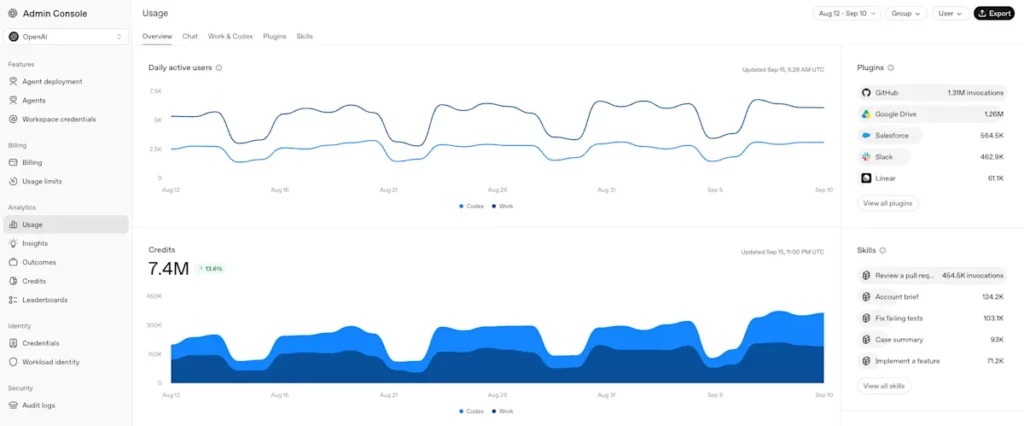
Usage analytics show where adoption is growing and spend is concentrated, helping admins focus support, review costs, and assess capacity requests. The Usage view brings together active users, credits, and token usage across ChatGPT Work and Codex. For example, filtering by group or user can reveal where adoption is low, giving admins a reason to review starting workflows and training needs with the team owner.
The Usage overview shows active users and credit trends across ChatGPT Work and Codex. All screenshots use illustrative demo data.
The task classifier in Insights helps admins understand what work AI supports by grouping a sample of messages into use cases and tasks. Software engineering, for example, includes feature development and code maintenance, while sales & revenue include account research and planning. The Overview tab shows the mix of work at a glance; the Use cases tab provides a detailed table with task breakdowns.
Admins can filter by group to see how teams use AI, then work with business owners to decide which workflows and outcomes to evaluate.
The Insights overview shows how credits are distributed across tasks, from implementing features to account research.
For the sales team shown below, account research and planning is the largest use of credits—a starting point for discussing how AI changes account preparation.
The Use cases table breaks down a team’s work by task, with credits, messages, and active users.
In task details, the Models, Reasoning, and Speed breakdowns show each setting’s share of credits for a task. This helps admins assess whether the setup fits the work and target training on model selection. A routine brief, for example, may be worth testing with a faster or lower-cost setup, comparing quality and the time spent reviewing and correcting it.
The Plugin leaderboard and Skills
Source
OpenAI · 16 Sep 2026 · 14:00 CEST
Open the original at OpenAI ↗